Auto-file email attachments to Google Drive
An n8n workflow: mail arrives, the attachment is read, classified, filed into the right Google Drive folder and written to a ledger row. No one touches it. This is the kind of task where today's AI actually pays for itself — and most attempts at it still fall over.
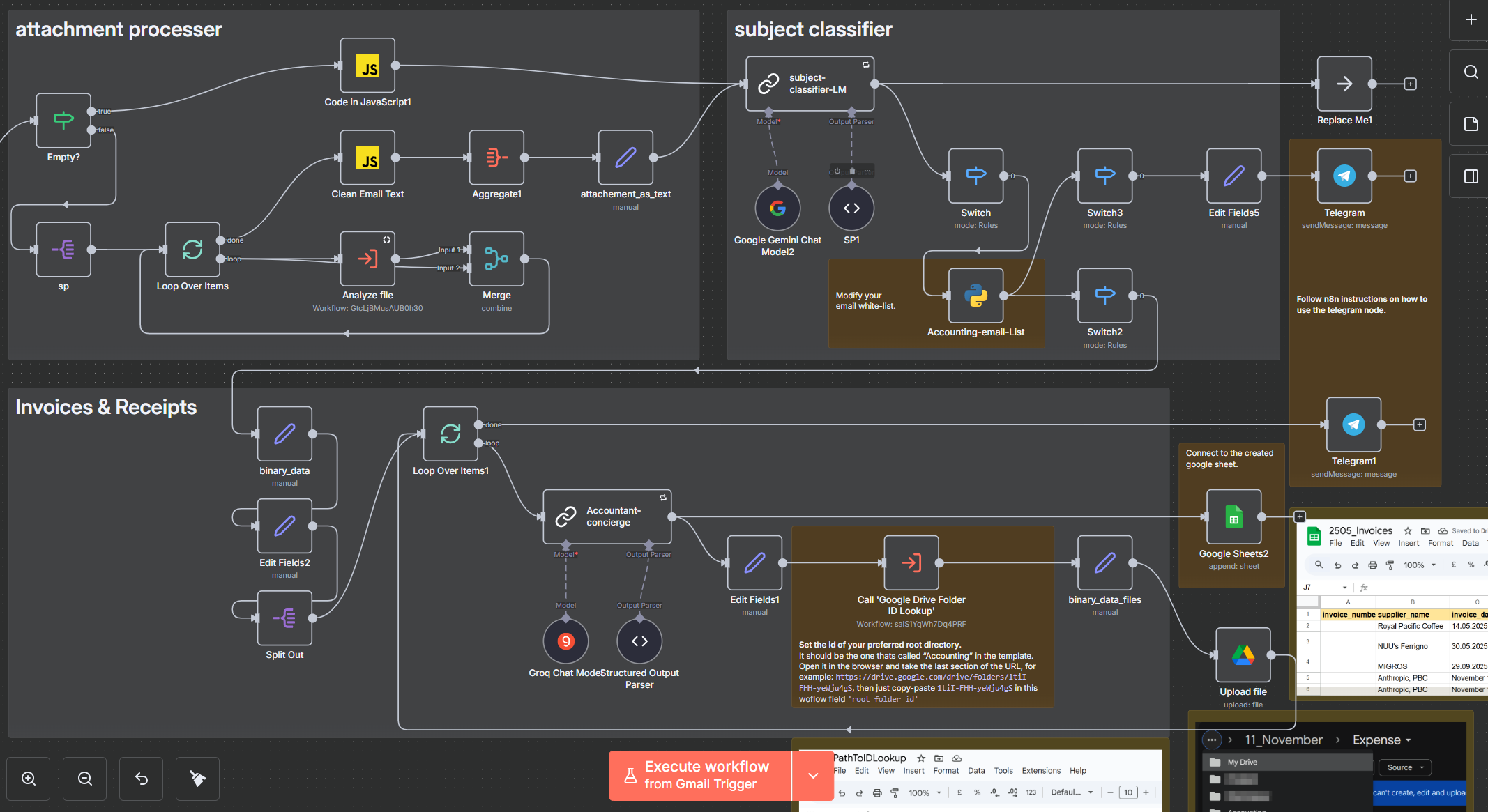
A Gmail message lands, the attachment is converted to text, a cheap model classifies it, an expensive one extracts the fields, the document is filed to Accounting/2025/11_November/Expense/ in Google Drive and a row appears in the Sheets ledger. Workflow JSON, setup guide and the node-by-node breakdown are in the repo.
One Google OAuth connection covers Gmail, Drive and Sheets; the models are Groq or Gemini Flash, both free tier. The two hours are the first-time cost — instance, Google connection, labels. With n8n already running other routines, adding this one is importing the workflow and preparing the spreadsheet: ten minutes.
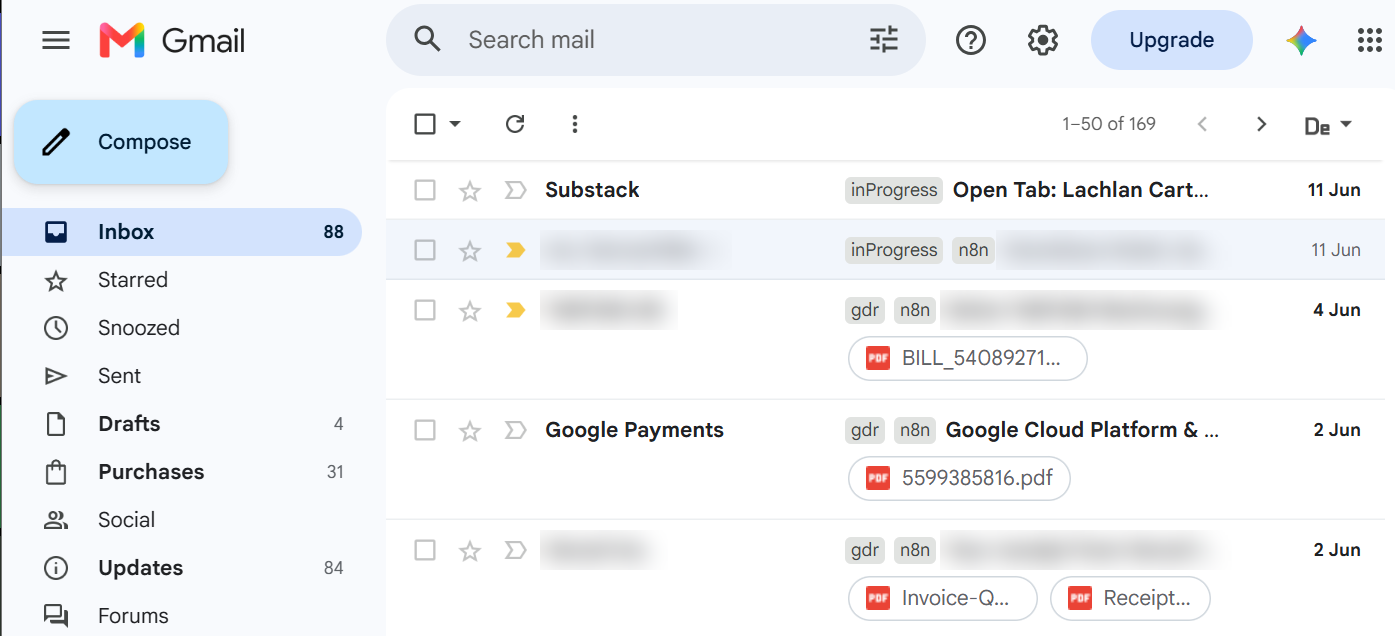
gdr + n8n means filed to Drive and finished; a message still carrying only inProgress never completed. Some senders and subjects blurred.What this automation takes off your week
- Filing. No download, no rename, no folder hunt —
gdrive-recursioncreates next month’s folder on the way past. - “Did we already pay this?” One lookup in one sheet, where one row is one invoice and the payment fields fill in when the receipt arrives.
- Month-end. The ledger is already written, and a monthly expense chart runs off the same sheet.
- The backlog.
gmail-processor-datesizefiles the mail already sitting in the mailbox, not just new arrivals. - Still yours. Marking an invoice paid, and a weekly glance at
label:inProgressto see what did not finish.
What n8n is, and why the connectors swap
n8n is a workflow tool you draw rather than write. Each step is a node on a canvas — a trigger, a service call, a snippet of code, a model — and arrows carry items between them. The node holds the credentials and API knowledge for its service, so after a run you click any node and see what went in and what came out. It runs on n8n’s cloud or self-hosted on your own machine, where it costs nothing and the documents never leave your infrastructure. Because the logic never names a vendor, every layer is replaceable:
| Layer | Default | Swap for |
|---|---|---|
| Gmail trigger | Outlook, IMAP, a shared mailbox, a webhook | |
| Files | Google Drive | Dropbox, SharePoint, S3, a local folder |
| Ledger | Google Sheets | Airtable, Notion, Postgres, Supabase |
| Models | Groq · Gemini Flash | anything with structured output |
| Notify | Telegram | Slack, email, nothing at all |
The two pieces that are not connectors are worth keeping: any-file2json-converter, which forces PDFs, DOCX and photos into one text shape, and the classify-then-route split that keeps the expensive model away from newsletters.
Other documents to point it at
Change the classifier prompt and the extraction schema and the same skeleton files something else:
- Contracts →
Contracts/{Client}/{Year}/, with term and renewal date extracted, so the ledger becomes a renewal calendar. - HR and applications →
Personnel/{Person}/, the row carrying role, stage and date received. - Orders and delivery notes → matched against the invoice they belong to.
- School or lab material →
Course/{Module}/, where the index is the useful output. - Insurance, warranties, claims → filed by policy, with the expiry date extracted.
Neighbouring shapes in the same repo: Telegram invoice OCR for paper you photograph, smart-table-fill for loose text into any table, LLM bulk responses for one prompt down hundreds of rows.
Why most email-attachment automations fail
They work on the invoice you picked and break on the next twelve. Four decisions carry this one: one login instead of five, a cheap model guarding the expensive one, one row per invoice rather than per file, and failures left visible as leftover inProgress labels. The AI part is two model calls; the rest is those four.