End the copy-paste marathon
That moment when you realize you're about to spend the next hour copying 50 Excel rows individually into ChatGPT.
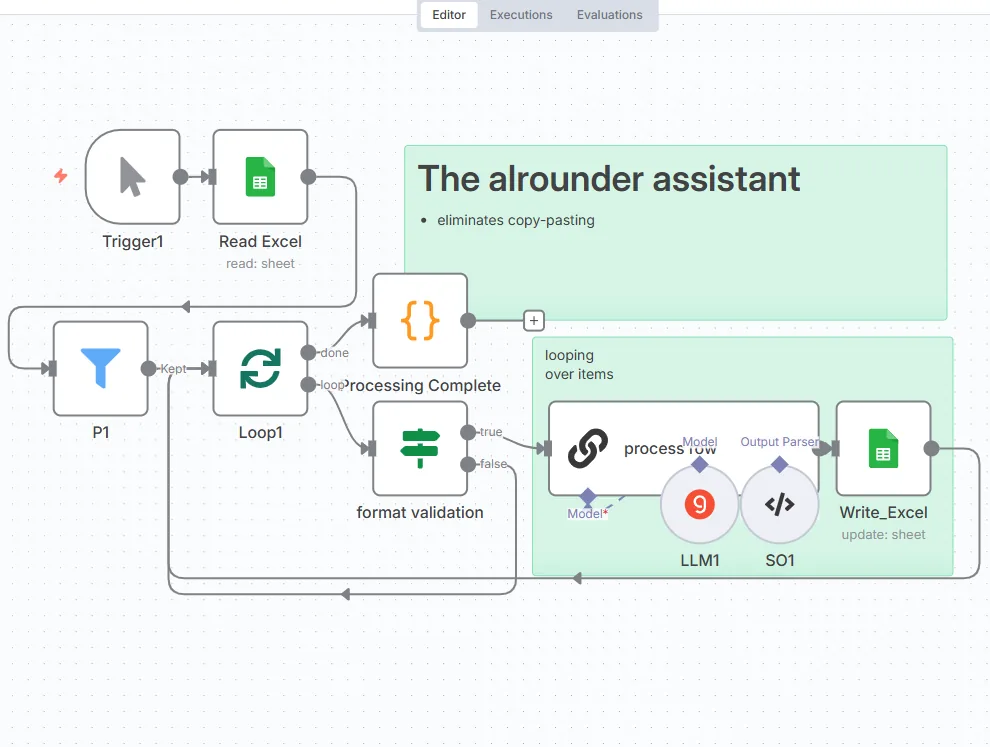
I connected my LLM directly to my spreadsheets. Sixty minutes of manual work became five minutes in the background. Twelve times faster, and I was not in the room for any of it.
The reason the manual version hurts is one crucial limitation: the ChatGPT web interface has no batch processing at all. You cannot paste 50 rows and say “analyze each one.” You copy them in one at a time, waiting for each response before the next.
The case that made me build it
I was researching elderly care facilities for my parents. They answer by email, at length, and every answer buries the three things I actually wanted: is there a place free, what does it cost, and do they run cognitive stimulation programmes.
Fifty long emails, three fields each. That is the shape of the problem, and it is everywhere: surveys, contact forms, supplier replies, application inboxes.
What the workflow does
n8n is a no-code automation tool that connects data streams. The build is small, and the canvas at the top of this post is the whole of it: read the range, iterate, one model call per row, write the answer back into the sheet.
That is the part worth keeping: only four nodes change each time. The sheet, the range, the prompt, the output columns. Everything else stays exactly as it is, which is why the second job takes minutes to set up instead of an evening.
Those repetitive bulk tasks are all automatable. The hour you were about to spend is optional.
If you want a longer worked example, the email attachment workflow files itself into Drive on the same principle.